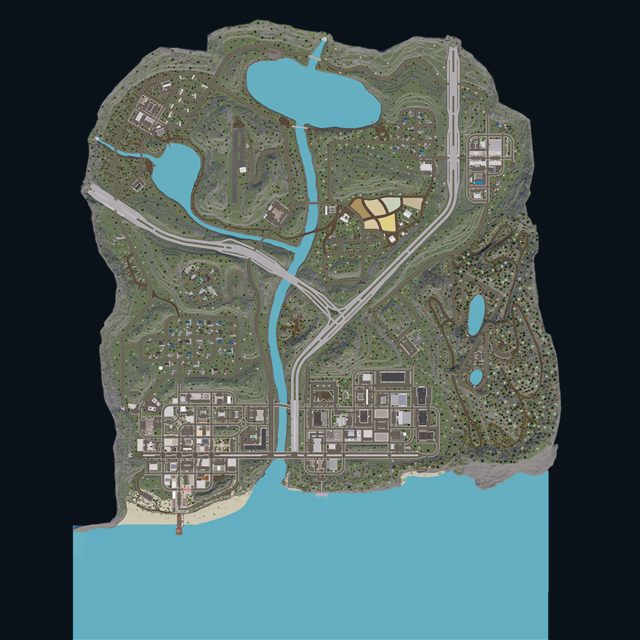
Live overview
Map, active calls, units, online players and recent activity on one screen.
01 Commandly
Continue with Roblox
Commandly
Continue with Roblox
Tools for ER:LC server teams
The command center for your ER:LC community. Watch every player and 911 call on a live map, see which units are on a call, and get a report for every session automatically. Run plates, file patient reports, log impounds and keep a full audit trail, all from one dashboard.
Made for the day-to-day
Live data from your ER:LC server, a CAD for every department and session reports that write themselves, without adding another headache to the shift.
Map, active calls, units, online players and recent activity on one screen.
01Pan and zoom Liberty County with players colored by team, 911 calls and jurisdictions.
02Team, callsign, location, postal and wanted stars, plus which units are on a call.
03Live ER:LC emergency calls with responders, sound alerts and one-click join.
04A personal session for every member in game, a multi session when 2+ are on, and a report at the end.
05Run plates and names. Issue citations and warrants, broadcast BOLOs and log arrests.
06Patient care reports, fire incident reports and premise hazard alerts.
07Impound and release vehicles, log roadside service and post road closures.
08Draw each team's area on the map and get alerted when a unit is outside it.
09Joins, play time, calls, sessions and every CAD action. Filter and export to CSV.
10Press Ctrl+K and type how you'd say it. “cad for police” finds the Police CAD.
11Sign in with Roblox. Each CAD opens only for its in-game team and the server owner.
12For the people behind the scenes
Whether you run a small server or a growing community, Commandly helps your team stay organized and focused on the roleplay.
Get started freePolice, Fire & EMS and DOT.
One dashboard for every department.
Straightforward plans
Every tool below is free today. Upgrade for more room to run your server.
THE ESSENTIALS
A great place to start your server's toolkit.
COMMANDLY PLUS
More tools and higher limits for growing servers.
Robux pricing is shown upfront. Purchase options will be available through Roblox when upgrades launch.
A few quick answers
Commandly is a dashboard for ER:LC community teams: an interactive live map, players and units, 911 calls, automatic session reports, CADs for Police, Fire & EMS and DOT, and audit logs.
They start on their own. Every member of your Commandly server gets a personal session while they're in game, tracking their play time, duty time and the calls they responded to. Whenever 2 or more players are on, a multi session tracks the whole server: peak players, units on duty, 911 calls and new players. Owners can also start a named session for events. Each one ends with a report you can copy straight into Discord.
The server owner can open every CAD. Everyone else gets the CAD for the team they're on in game right now: Police or Sheriff for the Police CAD, Fire for the Fire & EMS CAD, and DOT for the DOT CAD.
Yes. Commandly records every player and plate it sees in game, so plates and records still come up after the player has left the server.
Yes. The Audit Logs page downloads a CSV of every event that matches your current filters, including how long each player stayed in game.
No. The Free plan includes every tool listed above, and you sign in with your Roblox account.
Choose Monthly for 500 Robux each month, or Lifetime for a one-time 5,000 Robux payment. Roblox purchase options will be available when upgrades launch.